
The Recycle at Boots App helps people recycle certain beauty, health, wellness, and dental empties. It focuses on packaging that can be hard to recycle at home. You can record eligible items in the app and take them to a participating Boots store. Boots also offers rewards to eligible Advantage Card members who follow the scheme rules. The service uses Scan2Recycle technology to record and check each item.
This guide explains how the scheme works in 2026. You will learn how to get the app and add your empty products. It also explains which items may qualify and which should go elsewhere. You will see how the reward works and what limits apply. There is also help for common app problems and rejected items. This makes the whole process easier to understand before you visit a store.
What Is the Recycle at Boots App?
Recycle at Boots is the official app for the Boots recycling scheme. Boots UK and Boots Retail Ireland operate the scheme using Scan2Recycle technology. The main aim is to collect packaging that is difficult to recycle at home. This can include small products and packaging made from mixed materials. Toothpaste tubes, some cosmetics, and similar empties are examples listed by Boots. The exact item still needs to meet the scheme rules before it qualifies.
The app acts as a record of the items you want to return. You take a clear photo of each empty product and label it correctly. The system then checks whether the item is suitable for the scheme. Boots says validation can take up to 24 hours. Once an item is approved, you can take it to a participating store. This check helps stop widely recyclable packaging from entering the special recycling scheme.
Recycle at Boots App Download and Cost
The Recycle at Boots app download is available through official mobile stores. Boots provides links for both Google Play and Apple’s App Store. The iPhone App Store listing describes the app as free. Google Play also lists the official Recycle at Boots app from Scan2Recycle. You should use these official listings instead of downloading copies from unknown sites. This reduces the risk of installing an unofficial or outdated version.
People searching for a Recycle at Boots app free download do not need a paid app. There is no reason to pay a third-party website for the official app. After installation, you need to register for the recycling service. Your account details also matter if you want the Advantage Card reward. Boots says the recycling account must match the registered Advantage Card holder. The scheme and reward rules can change, so check Boots before making a special trip.
How to Use the Recycle at Boots App
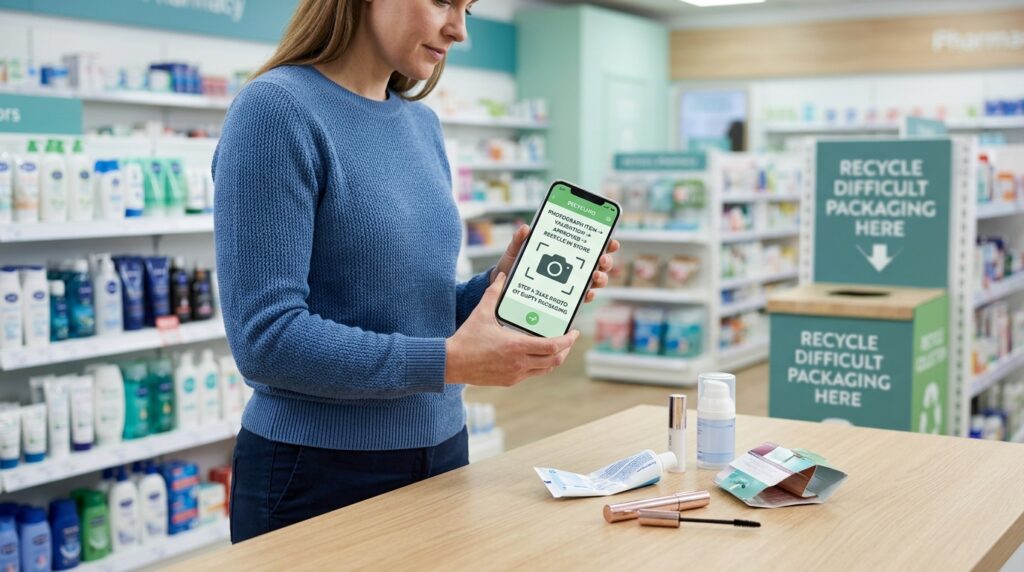
Start by finishing the product and making the packaging as empty as possible. Boots also asks customers to clean products as much as possible. Open the app and add the empty product to your recycling account. Take one clear photo showing the whole front of the product. The brand and product type should be easy to see. You then choose the correct brand and product type from the available options. Boots says you do not need to photograph the barcode or product back.
Wait until the system has checked the item before visiting the store. When approved, bring your empties to a participating Boots location. Scan the QR code on the official recycling box to confirm your deposit. Select at least five approved items if you want to qualify for the reward. Confirm the deposit in the app, then place those items inside the recycling point. A useful habit is to register several empties at home first. That way, you are less likely to arrive with items that have not been approved.

What Can You Recycle at Boots?
The scheme is mainly for hard-to-recycle beauty, health, wellness, and dental packaging. Boots gives examples such as small cosmetics and travel-size products. Mixed-material items may also qualify because normal recycling can be difficult. Examples include some makeup palettes, compacts, lipsticks, lotion pumps, and toothpaste tubes. The product does not have to be a Boots-brand item. Still, an item must appear as an accepted type in the Scan2Recycle system.
Do not assume that any empty bathroom product belongs in the Boots box. Widely recyclable materials are normally excluded from this scheme. Boots gives examples such as paper, card, glass jars, and aluminium packaging. Full-size shampoo and shower gel bottles may also belong in household recycling. Local recycling rules can differ, so check your council or local service. Think of Boots recycling as an extra route for difficult items, not a replacement for normal home recycling.
How the Boots Recycling Reward Works
In the UK scheme, eligible Advantage Card members can receive 500 points. You need to deposit at least five qualifying items in one deposit. You must then spend £10 or more in one transaction at a participating store. Boots describes those 500 points as £5 worth of Advantage Card points. People without an Advantage Card can still use the recycling point. They simply do not receive the recycling reward.
The reward has several limits that are easy to miss. Boots says it must be used on the same calendar day it is issued. Once you activate the barcode, it stays active for five minutes. You should therefore wait until you are ready at the till. The reward cannot be redeemed at a self-checkout. Boots also limits accounts to eight recycling rewards in a calendar month. Only one reward can be claimed per day, even if you deposit more than five items.
Common Mistakes That Can Stop a Reward
One common problem is uploading the wrong type of product. Another is choosing a label that does not match your photo. Boots says the item should be whole and in its original form. Taking parts apart may stop the item from qualifying. You should also avoid uploading duplicate images or trying to reuse the same product. Make sure the front of the item is clear before sending the photo. A dark or blurry picture can make the checking process harder.
Another mistake is depositing items before thinking about the reward rules. For example, you may recycle your five products and then leave the store. Your reward can expire if you do not use it that day. You may also lose your chance if you activate the barcode too early. Plan your deposit for a day when you already need something from Boots. If you want the points, make sure your qualifying purchase reaches the current spending threshold.
Recycle at Boots App Not Working: What to Try
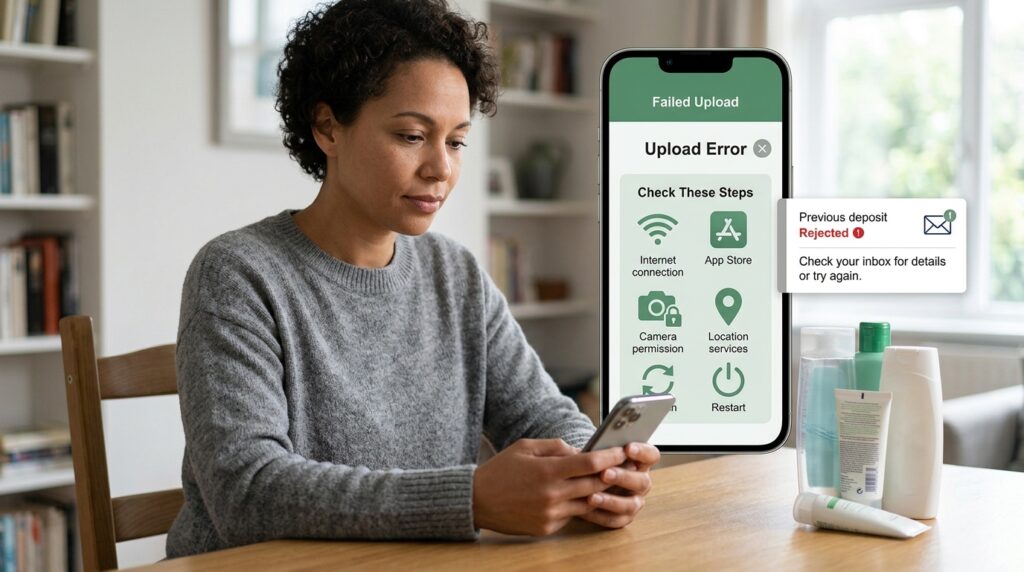
If the Recycle at Boots app is not working, first check your internet connection. Then close the app and open it again. You can also check Google Play or the App Store for an update. Restarting your phone may fix a temporary problem. If photos will not upload, check that the app can access your camera. Boots also requires location services for banking and depositing under its current scheme rules.
If an approved deposit or reward does not appear, refresh the account first. The official app listing also suggests checking the deposits area. If a deposit was rejected, check your email and junk folder. There may be a message explaining the reason. Do not keep submitting the same item without checking what went wrong. For a problem that continues, use the official Recycle at Boots support options. This is safer than following old fixes from unofficial download sites.
A Simple Recycling Routine That Saves Time
A small routine can make the scheme much easier to use. Keep a clean container at home for possible Boots recycling items. Add difficult beauty and health packaging after you finish each product. When you have several items, check them in the app from home. Wait until they are approved before packing them for your store visit. This avoids carrying products that the scheme will not accept. It also gives you time to find another recycling route for rejected packaging.
For example, imagine you finish a mascara, toothpaste tube, and several travel minis. You keep them clean and store them together. Once you have enough items, you photograph each product in good light. You select the correct labels and wait for approval. Then you find a participating Boots store and take the approved items. If you plan to claim a reward, check the current rules before depositing them. This simple routine can prevent most last-minute problems.
UK and Ireland Users Should Check Their Local Rules
The Recycle at Boots scheme operates in both the UK and Ireland. The basic process is similar in both places. Users register items, wait for validation, and use participating store recycling points. Yet some details can differ between the two countries. For example, the Irish Boots page lists a €10 spending threshold for its reward. The UK Boots page lists a £10 threshold. This is why local terms matter when you use the service.
Your account should also match the country linked to your registered details. Do not rely on a UK article for every Irish scheme rule. The same is true in the other direction. Store participation can change as well, so check the Boots store finder or recycling page. This takes only a short time and can save a wasted trip. It is especially useful if you have not used the scheme for several months.
Frequently Asked Questions
Is the Recycle at Boots app free?
Yes. The official Apple App Store lists Recycle at Boots as free. Boots also links users to the official Google Play version.
Can I recycle products from brands other than Boots?
Yes. Boots says the scheme accepts qualifying empties from any brand. The item still needs to meet the recycling scheme rules.
Can I recycle fewer than five items?
You can use the recycling point without earning a reward. The current UK reward needs at least five qualifying items in one deposit.
Do my products need to be completely empty?
Boots says qualifying items should be used and as empty as possible. Cleaning away remaining product can also make handling easier.
Can I claim a Boots recycling reward online?
No. The current UK reward is for a qualifying purchase in a participating store. Boots says it cannot be used for online purchases.
What happens to products after I recycle them?
Boots says collected materials go to MYgroup. Materials are sorted and recycled where possible. Some mixed material can be made into products such as MYboard.
Final Thoughts
The Recycle at Boots App gives difficult packaging another recycling route. The main process is simple once you understand the steps. Register your account, photograph suitable empties, and wait for approval. Then take approved products to a participating Boots store. Scan the official recycling point and complete your deposit. If you use an Advantage Card, check the reward terms before activating anything.
The best approach is to prepare your items before leaving home. Check whether normal household recycling already accepts each package. Use the Boots scheme for items that fit its current rules. Keep the products whole and choose accurate labels in the app. Most importantly, check Boots for current limits before your visit. Scheme rules, participating stores, and reward terms can change over time.
Disclaimer
This article is for general information and was written with AI assistance. Details may change and may not cover every situation. Check current information through Boots, Scan2Recycle, or another trusted official source before relying on it.