

Email is how we talk at work, but it can be unsafe. In 2026, smart computers make fake emails that look real. Old safety tools often miss these new tricks. That is why businesses use AppRiver. It is a cloud shield that stops bad emails before they reach you. AppRiver is now part of OpenText, making it stronger against new dangers daily.
Many people think email filters only block junk mail. But modern tools do much more. They stop fake links, hidden code, and sneaky messages that try to fool you. This guide explains how AppRiver works as a full guard for your inbox, not just a spam blocker.
Understanding this difference is important. Keeping your team safe today takes more than an old filter. You need a smart shield that learns and adapts. AppRiver provides this protection in the cloud, so threats are stopped early. This keeps your work email safe and secure every single day. Knowing how it works helps you trust your email system more.
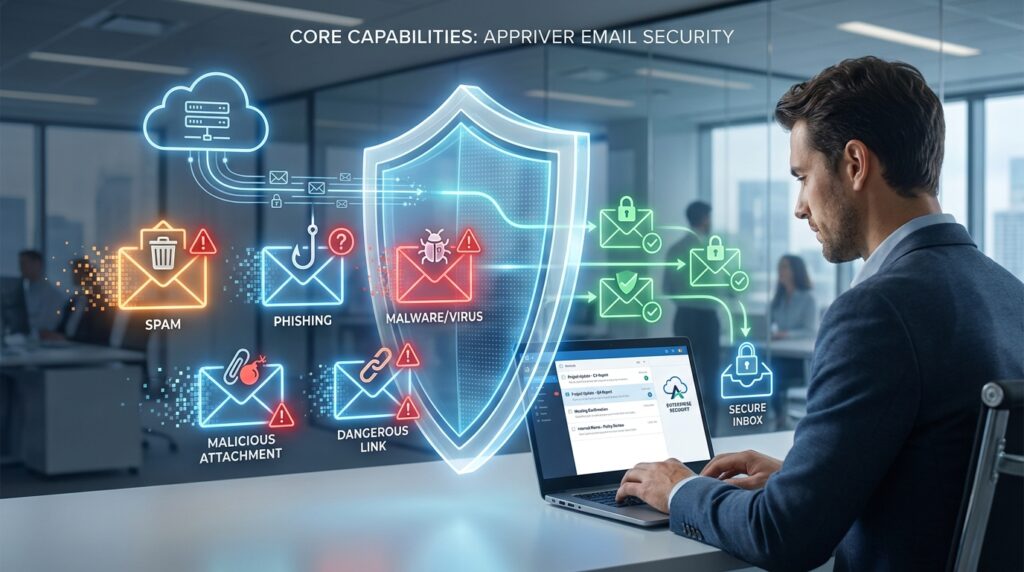
Core Capabilities of AppRiver Email Security
This tool checks every email the moment it arrives. It looks for spam, viruses, and fake messages all at once. You do not need separate tools for each threat. Because it works in the cloud, your computers stay fast. There is no waiting for scans to finish.
It connects directly to Microsoft 365, so you do not install extra software on laptops. The system gets constant safety updates from OpenText’s global network. When a new threat appears anywhere, the shield learns instantly. No one has to press a button. Your protection grows every hour while you work.
Web protection is also included. If someone clicks a risky link in an email, the system blocks the dangerous site before it opens. All these parts work together smoothly. This keeps your digital space clean and safe without slowing you down. You get strong, automatic protection that stays current. Your team can focus on work while the cloud shield handles security quietly and effectively in the background.
Post-Acquisition Integration Benefits Under OpenText
You might wonder if joining OpenText changed AppRiver. The good news is that it made the tool smarter. Before, AppRiver had its own threat list. Now, it shares knowledge from millions of OpenText users worldwide. This helps catch rare attacks that smaller systems would miss.
The management screens are now combined. You do not have to switch between websites for security and other tasks. Billing is also simpler with one invoice, reducing paperwork. These changes happen behind the scenes, so the friendly feel stays the same while the power grows stronger.
Support is faster during emergencies because teams share resources across the whole group. The merger built a better shield, not just a new name. You get deeper protection through shared global intelligence. Management is easier with unified tools. Billing is less stressful with combined invoices. Support responds quicker with pooled expertise. All this happens without changing the simple experience you already know. The result is a stronger, smarter email security system that works better for everyone while staying easy to use every day. Your team gets top-level safety without extra complexity or confusion.
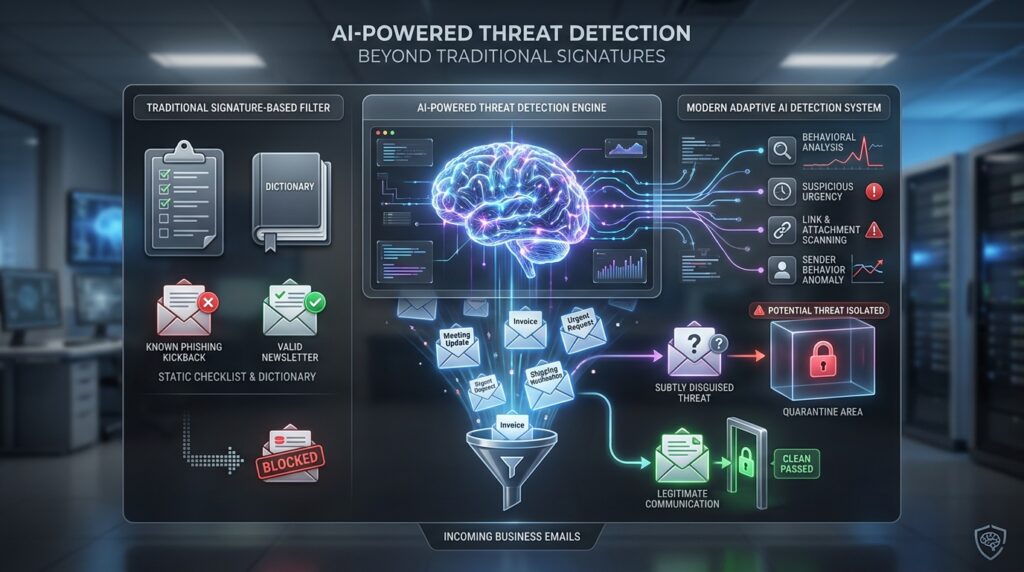
AI-Powered Threat Detection Beyond Traditional Signatures
team. That means fewer false alarms and more real threats stopped quietly in the background. You get protection that thinks like a careful helper rather than a robot reading a fixed list.
Old email filters were like simple dictionaries. They only knew bad words they had seen before. If a fake message used new spelling or polite language, it could slip through. Today’s tool is smarter. It watches how people act and write, not just words.
It notices when a sender sounds strangely urgent or asks for money out of nowhere. It checks if the person usually talks to you or if the conversation feels new and odd. Because AI learns from 2026 attack styles, it spots fakes that look almost real. This smart approach fixes the gaps left by old rules that cannot learn.
Over time, the tool learns what is normal for your team. This means fewer false alarms and more real threats stopped quietly. You get protection that thinks like a careful helper, not a robot reading a fixed list. It adapts to keep you safe as tricks change. Your email security grows smarter every day without extra work from you. This keeps your team protected with less noise and more accuracy.
Practical Deployment for SMBs Without Dedicated Security Teams
Small businesses often worry that strong security needs a full-time expert. AppRiver solves this by doing the hard work automatically. Safe settings come pre-set, so you do not have to guess. If an email is held, regular staff can review and release it themselves using a simple dashboard. No tech support call is needed.
Reports are clear and visual, showing trends at a glance instead of confusing data. Setup takes just a few hours because there is no complex hardware to install. Built-in tips teach admins as they go, turning tasks into learning moments. This managed approach lets small teams enjoy big-company safety without hiring extra people. It removes the fear of breaking something while staying protected. That is why many growing businesses choose AppRiver when moving beyond basic filters. You get enterprise-level security that is easy to use and maintain. Your team stays safe without needing specialized expertise or expensive resources. The system guides you gently, making security simple and stress-free for everyone.
Compliance and Data Residency Considerations in 2026
Keeping data safe means following laws, not just stopping hackers. Rules like GDPR and HIPAA require careful handling of personal information in emails. This platform lets you choose where your messages are processed, so data stays within required borders. Audit logs show who accessed what and when, ready for inspectors at any time.
Many guides skip this, but it matters deeply for clinics, schools, and global firms. OpenText supports these choices without slowing email or adding cost. Being able to prove compliance easily builds trust with clients. You can rest easy knowing your email practices meet legal rules wherever you operate.
This feature shows the tool values both safety and responsibility equally. It turns security from a burden into a confidence builder. Your team stays protected while meeting legal requirements effortlessly. Data residency and audit trails work smoothly in the background. This ensures you remain compliant without extra effort or expense. Clients trust you more when they see responsible data handling. Peace of mind comes from knowing your email system respects both privacy and the law completely

Real-World Performance Metrics and User Experience Trade-offs
No security tool is perfect. Being honest about limits builds trust. Tests in 2026 show high spam catch rates, but brand-new attacks can sometimes slip through. Mistakes are rare, but places like hospitals may need small adjustments so important emails do not get blocked by accident.
Emails usually arrive quickly. Sometimes delivery slows down a little when the system blocks a huge wave of global threats. Some users with low risk and tight budgets prefer simpler tools. Others find the strong protection worth the small learning curve at setup.
Knowing these trade-offs helps you decide if this tool fits your real needs. Balanced views prevent disappointment when expectations meet actual use. Transparency matters more than promises of perfection. This honesty helps you make a smart choice for your team. You get reliable protection with clear understanding of its boundaries. Trust grows when you know both strengths and limits upfront. Picking the right tool keeps your team safe and happy every day. You avoid stress and get security that truly fits your work.
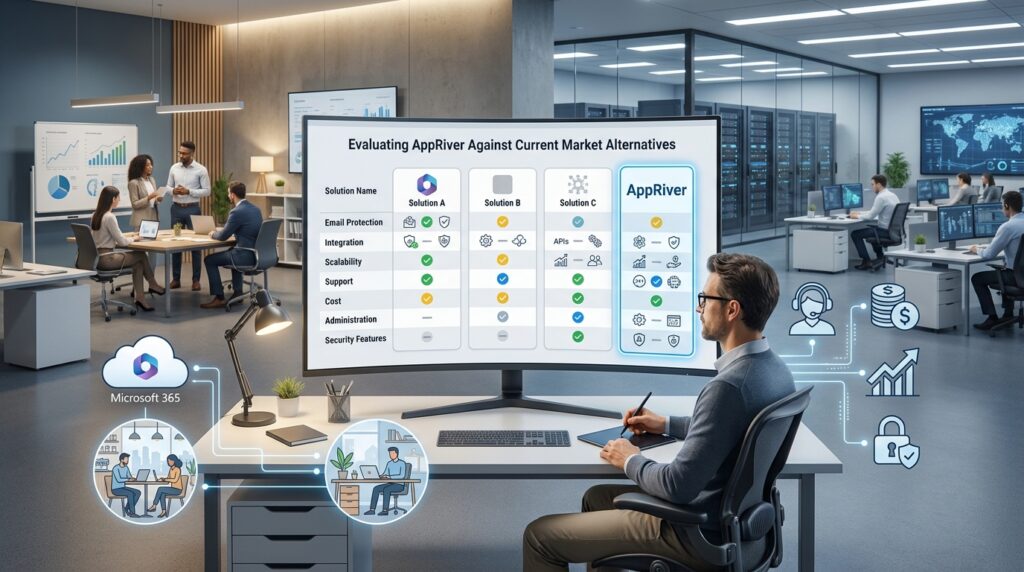
Evaluating AppRiver Against Current Market Alternatives
Choosing the right tool depends on your needs, not just feature lists. Ask how well it works with the chat and file apps your team uses every day. Look at the total cost over time, including training and possible downtime when switching. Test support speed yourself before signing up, because help matters most during problems.
Check if it grows easily as you hire remote workers or open new offices. A perfect match for a hospital might be too much for a small bakery. Your current tech setup should guide your choice more than flashy ads. Real context beats raw specs when protecting actual people and daily work.
Take time to compare based on your real daily needs, not generic top-ten lists. Think about your team’s actual workflow and budget. The best tool fits your specific situation perfectly. It should make work easier, not harder. Focus on what truly helps your people stay safe and productive each day.
Implementation Best Practices and Optimization Strategies
After choosing this tool, small changes make a big difference daily. Start with the suggested settings and adjust slowly based on what your team actually gets. Mix technical rules with short monthly talks about current scams so people stay alert.
Check the quarantine folder weekly at first. This teaches the system your normal email style. Do not make rules too strict early on, as this causes frustration and missed messages. If delays happen, review recent setting changes before blaming the tool itself.
Keep training focused on real threats from your reports, not generic videos. Over time, these habits turn a good tool into a great fit for your team. Success comes from steady care, not just the first setup. Small daily efforts build strong protection that works smoothly for everyone.
Conclusion: Positioning AppRiver Within a Layered Security Strategy
Remember that email safety is just one part of a bigger picture. Strong passwords, device protection, and backups must work together with this filter for full coverage. No single tool can stop every danger in today’s digital world.
AppRiver works best when paired with alert people and other security systems. Its cloud strength gives you time and peace of mind against new threats. As 2026 moves forward, staying flexible matters more than chasing one perfect solution. Use layers of protection instead of relying on just one thing.
Use this knowledge to build confidence, not laziness, in your security journey. You now have a clearer map to handle email risks with wisdom and calm. Keep learning and adjusting as threats change. Trust that steady care protects best. Small daily efforts create strong defense over time. Your team stays safer when everyone plays their part alongside the right tools.
Frequently Asked Questions About AppRiver
Does AppRiver work with Gmail or only Microsoft 365?
It works best with Microsoft email systems. Some setups can also support Google Workspace, but this needs special routing steps. Always check if it fits your exact email provider before you buy. This simple check helps you avoid surprises later. Making sure everything matches keeps your setup smooth and stress-free from day one.
Can I test AppRiver before committing to a paid plan?
Yes, most partners offer free trial periods. You can test real filtering on your actual emails during this time. This hands-on preview shows you how well it works for your specific needs. It is much better than watching a demo video because you see real results with your own messages. Testing with your real email flow helps you make a confident choice before committing.
How quickly does protection start after signup?
Cloud setup usually takes just a few minutes after you update your DNS records correctly. The system starts working right away, but it gets better over several days. It learns your team’s normal email habits and who your trusted senders are. This learning period helps the tool fine-tune its protection for your specific needs. Full effectiveness builds gradually as it understands your unique communication patterns.
What happens if AppRiver blocks a legitimate email?
Held messages go to a safe quarantine folder that users can access themselves. People can review these emails and release them if they are actually safe. Admins get alerts when the same sender gets blocked many times. This helps admins adjust rules early before problems grow. Users stay in control of their own messages while admins keep the overall system running smoothly.
Is training included for non-technical staff?
Built-in tips and simple screens mean you do not need long training classes. The system guides you as you go, making everyday tasks easy to learn. Many providers also offer welcome calls to help your team get started. These friendly sessions cover the basics and answer your first questions patiently. You get support right when you need it most, without complicated setup or confusing manuals.
Does it protect against ransomware delivered via email?
Yes, malicious attachments and links carrying ransomware are blocked before reaching inboxes. Behavioral analysis adds extra defense against novel payloads that lack known signatures.
Can I customize retention periods for quarantined items?
Retention settings are adjustable to match your compliance needs and storage preferences. Shorter periods save space while longer ones provide safety nets for delayed discovery of false holds.
How does billing work after the OpenText integration?
Bills now combine AppRiver services with other OpenText products in one account. This makes paying simpler with just one invoice instead of many. Current customers were moved smoothly to the new system. Prices did not go up just because of the merger. You get easier billing without extra costs from the change. Everything stays clear and fair while managing your security tools becomes less paperwork for your team.